
01 / Business Intelligence Suite
See the whole business. Run it from one place.
Namin plugs into QuickBooks and turns your numbers into answers: what to reorder, who owes you, what is selling, what is coming back. Then your team acts on them — order requests, approvals, shipments and returns — in the same suite.
14 days free · connect QuickBooks in two minutes · no credit card
- Works with QuickBooks Online
- Synced every 15 minutes
- QuickBooks stays your system of record
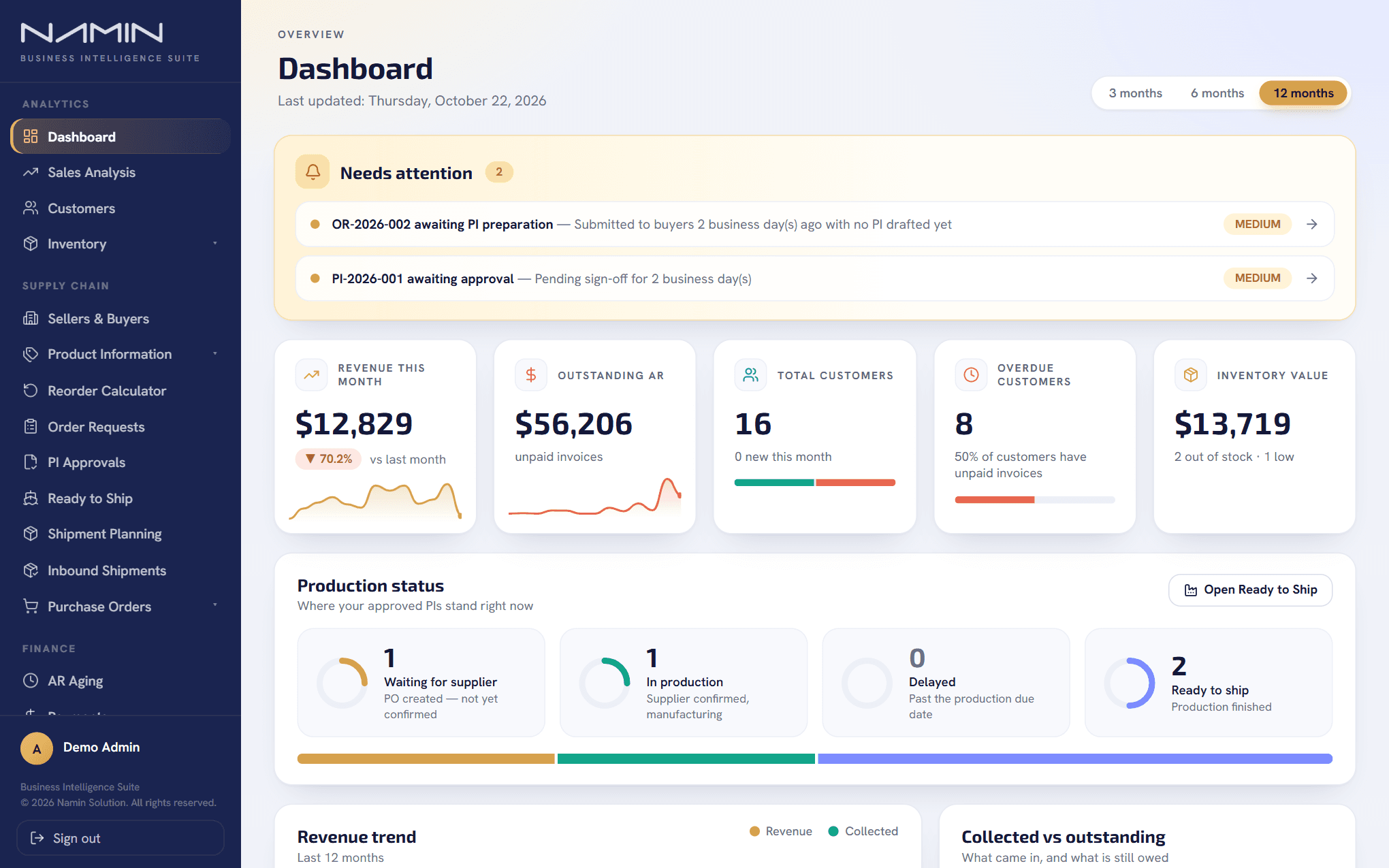
Product screenshot with demo data.
02 / Built for the people who run the business
One suite, every seat at the table.
Everyone works from the same live numbers. Each role sees the part that matters to them.
Owner / CEO
One dashboard: revenue this month, receivables, stock value and anything waiting for a decision.
CFO / Finance
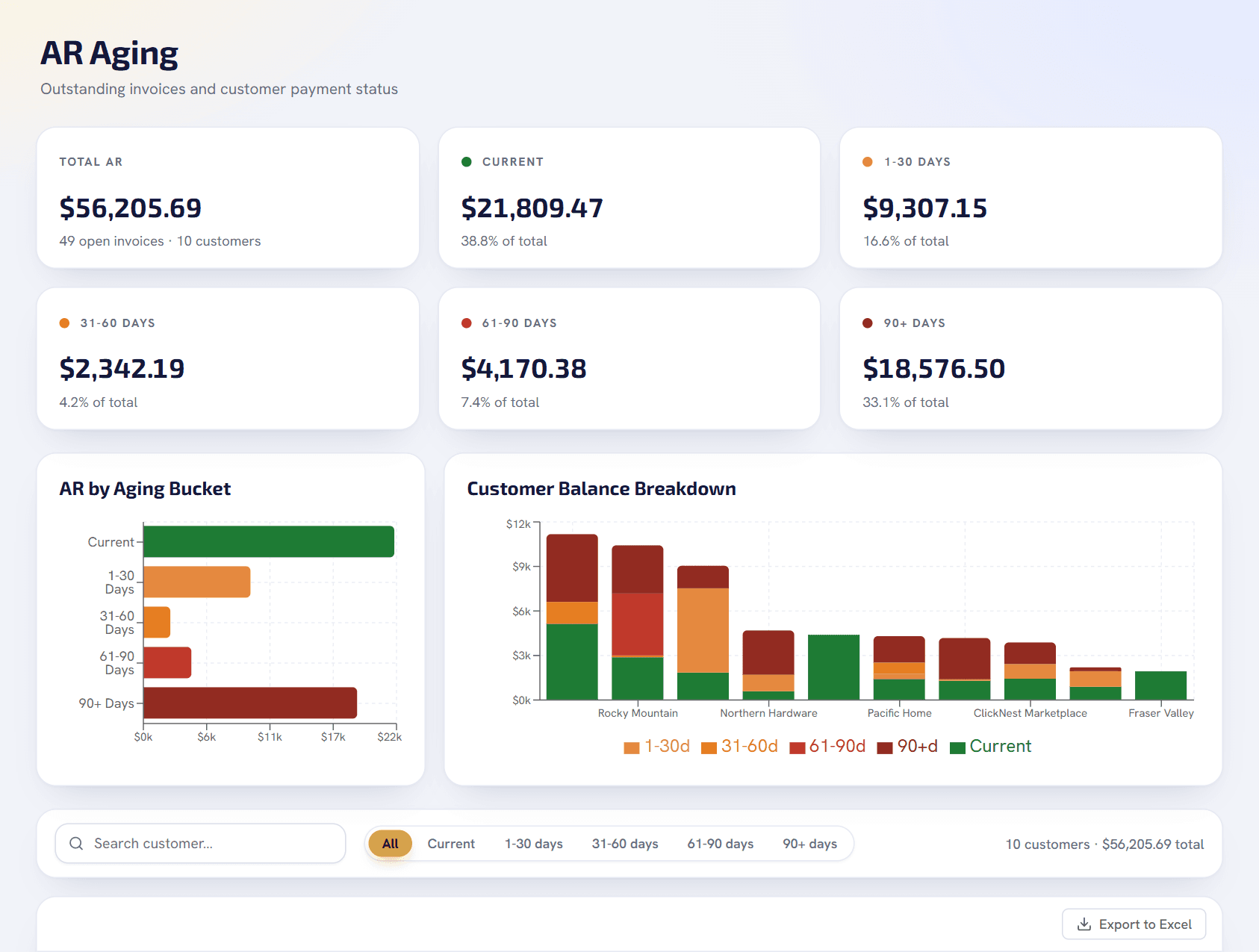
Receivables aging by customer, payments applied and unapplied, and credit memos from returns — built from your own QuickBooks numbers.
COO / Operations
Orders, production status, shipments and returns in one pipeline, with every hand-off logged. Nothing waits silently.
Purchasing
Reorder suggestions that know your lead times, orders split by supplier, and one clear approval before anything reaches QuickBooks.
Sales
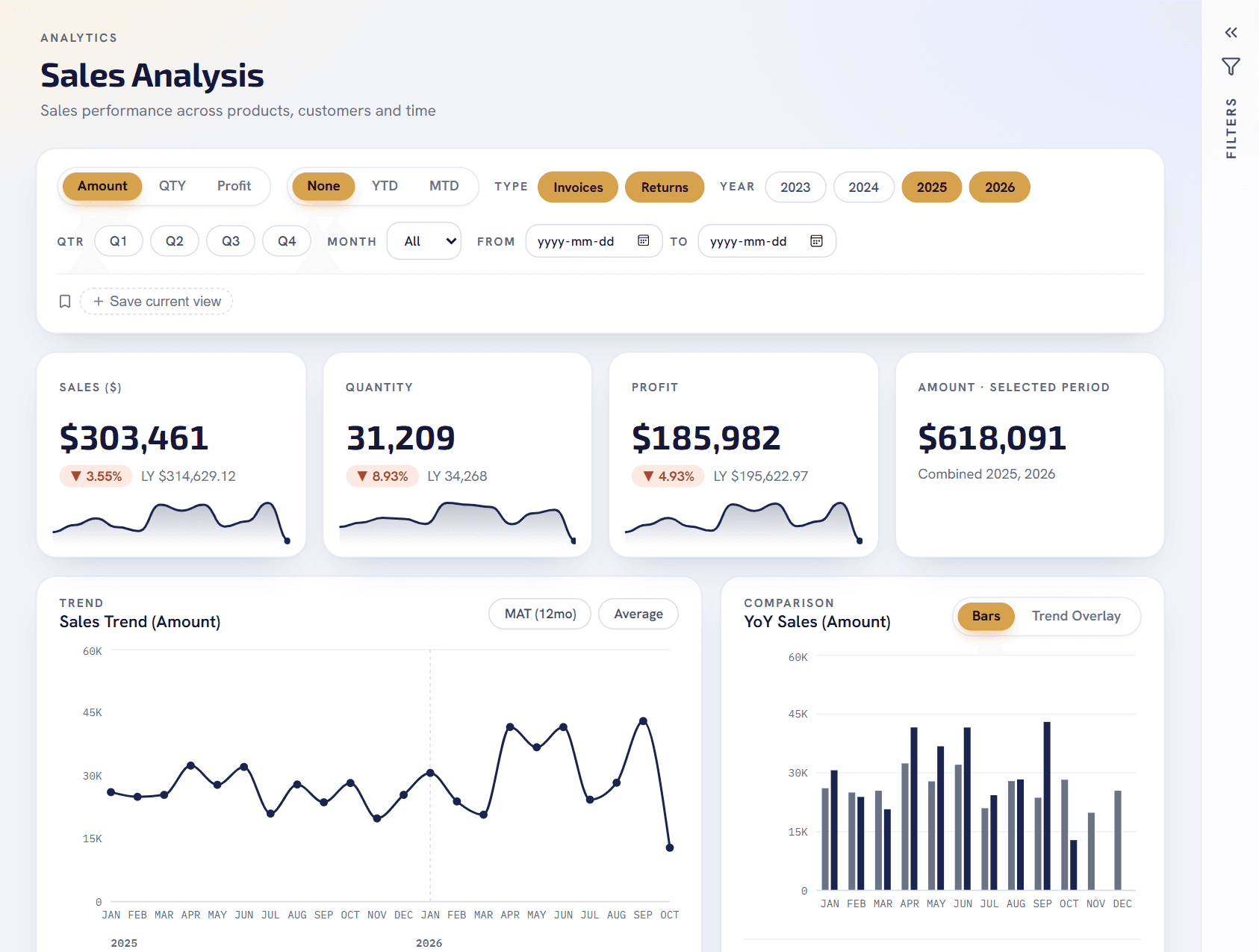
Sales by customer, product and category, year over year — and a list of the customers who have gone quiet.
Everyone, safely
Each person sees what they should. Page access and row-level visibility are enforced on the server, per role.
03 / What it does
Answers first. Then the tools to act on them.
01 / Reorder intelligence
Know what to buy before you run out.
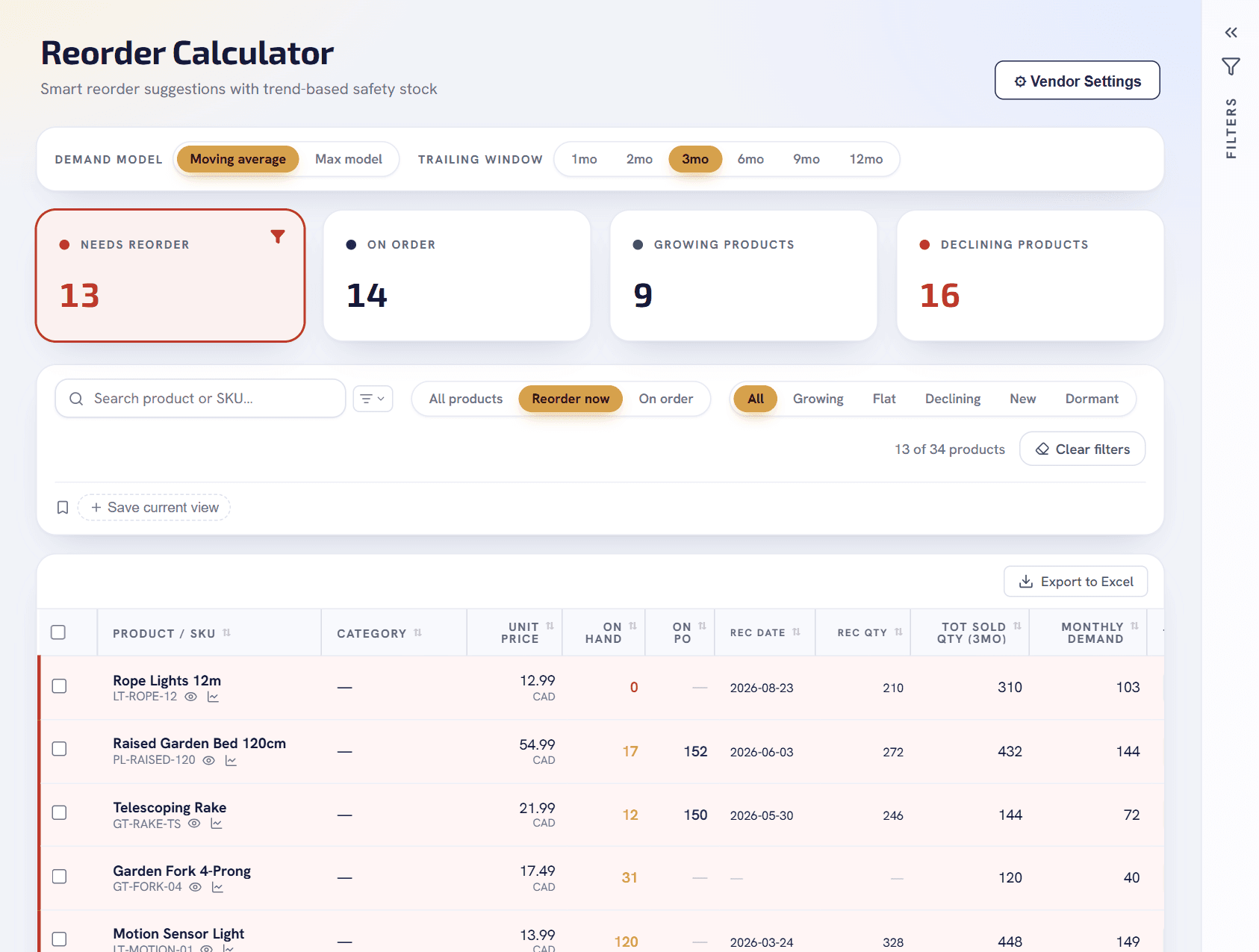
- A live suggested quantity for every product, from stock on hand, open purchase orders, sales trend and lead time.
- Lead time per product, per supplier or company default — with an override to test a “what if” on the spot.
- One click turns the suggestions into an order request.
02 / Orders and approvals
From suggestion to purchase order, with a paper trail.
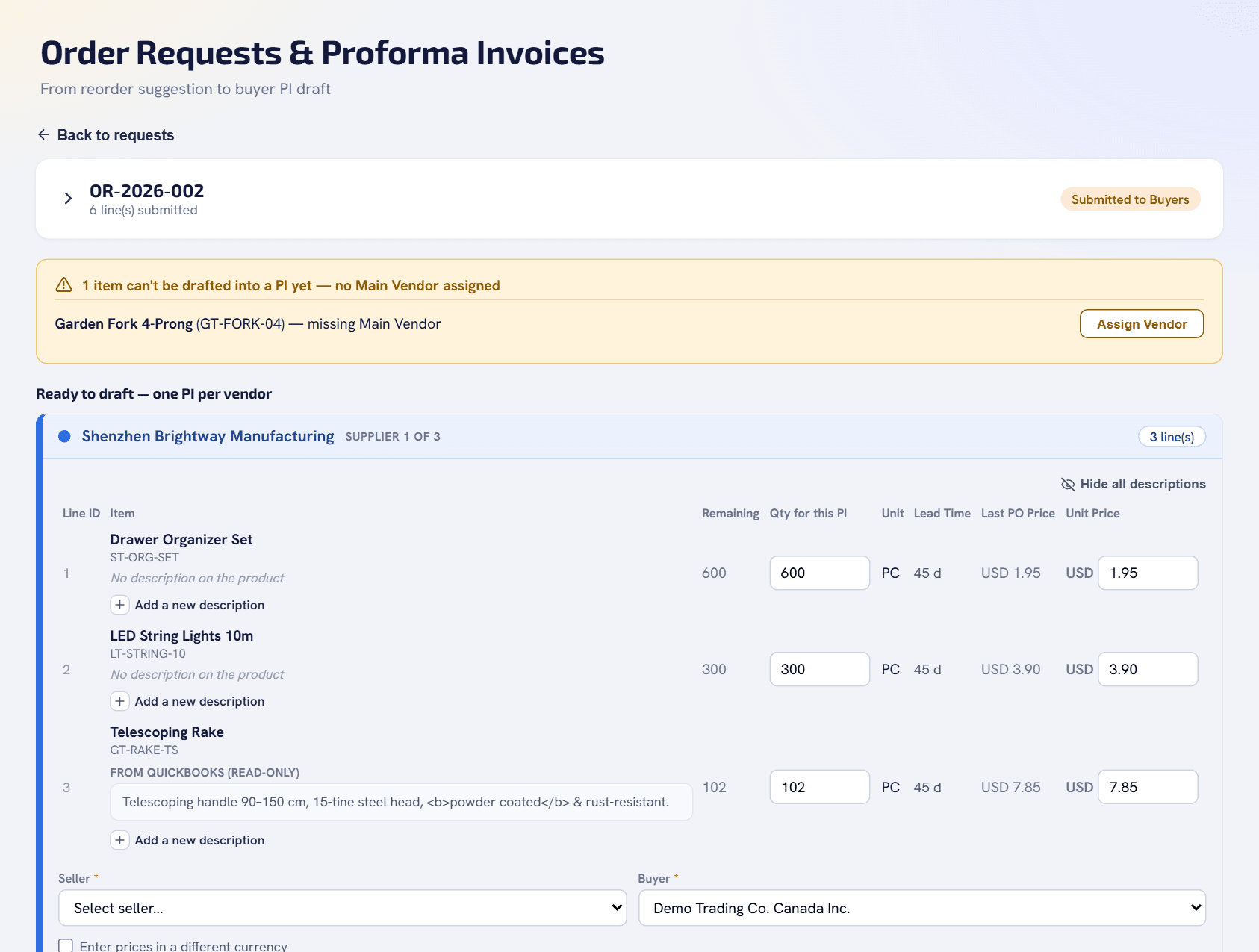
- Requests split automatically into one proforma invoice per supplier, each supplier colour-coded.
- Buyers add an updated product description; the manager sees exactly which lines changed before approving.
- An approved proforma invoice creates the real purchase order in QuickBooks, so nobody retypes anything.
03 / Returns (RMA)
Returns that end in a credit memo, not a spreadsheet.
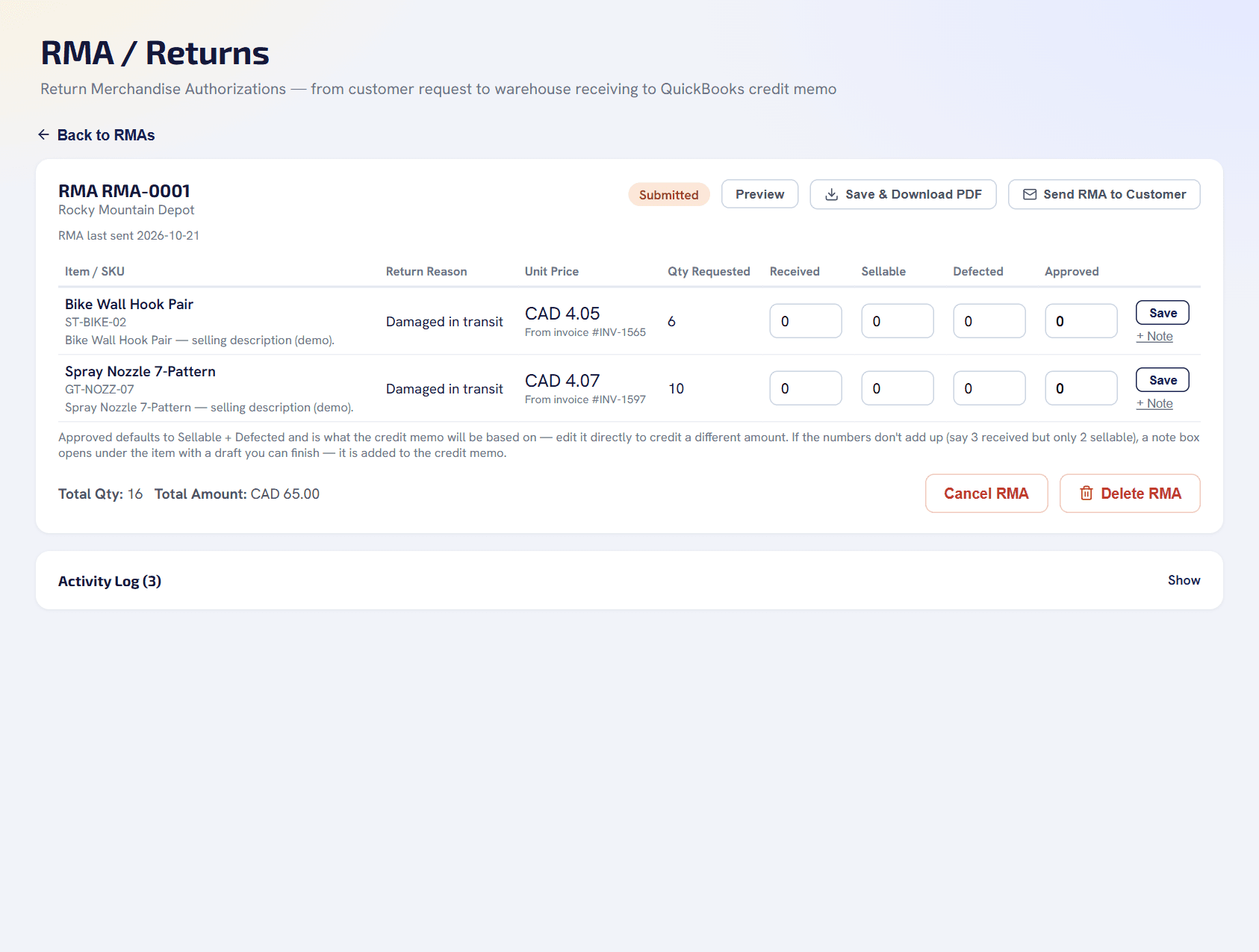
- Open an RMA for the customer, receive the goods at the warehouse, record what is sellable and what is defective.
- Email the RMA to your customer — to several people, with CC — straight from the app.
- Create the QuickBooks credit memo from what you actually approved.
04 / Receivables and cash
Know who owes you, and how late.
- Aging buckets from current to 90+ days, and the balance of every customer at a glance.
- A payments view that shows what is applied and what is not, filterable by month and year.
- Export to Excel with numbers and dates formatted the way a spreadsheet expects.
05 / Sales and customers
See what is selling, and who has gone quiet.
- Revenue by customer, product and category, with year-over-year and trend comparisons built in.
- Top customers, dormant-customer detection and RFM segmentation — know who is slipping before they are gone.
- Save the views you look at every Monday.
04 / Plug and play
Connected in a day, not a project.
We set up your QuickBooks connection and your first admin account — usually within one business day.
Connect QuickBooks
Authorize through the official QuickBooks connection. Nothing to install, nothing to re-enter.
Your data shows up
Customers, vendors, items, invoices and purchase orders sync every 15 minutes. QuickBooks stays the source of truth.
Switch on what you need
Analytics for everyone from day one. Add the operations module when your team is ready to leave spreadsheets and email.
Business intelligence on your QuickBooks data
- Dashboard
- Sales Analysis
- Customer Analytics
- AR Aging & Payments
- Inventory Overview
- Product Master & bulk Excel updates
- Roles, users & row-level access
Operations that act on what the numbers say
- Reorder Calculator
- Order Requests & Proforma Invoices
- Approvals & automatic QuickBooks purchase orders
- Production, shipping & receiving
- Returns (RMA) & credit memos
- Defective items
05 / Optional operations module
One pipeline, start to finish.
When you are ready to move purchasing off spreadsheets and email: every hand-off logged, every pending step visible.
Reorder suggestion
A live calculator watches on-hand stock, what is already on order, sales trend and each product’s lead time — and tells you what to buy, and when.
Order request
Buyers turn suggestions into a request in one click. Order rules add companion products; every quantity change is logged.
Proforma invoice
Requests split automatically by supplier — a product with more than one supplier goes to whichever is marked Main.
Approval
A single, clear approval before anything reaches QuickBooks. Every decision is logged with who and when.
QuickBooks PO
An approved invoice creates a real purchase order in QuickBooks, custom fields and all. QuickBooks stays the system of record.
Production & shipping
Track production status, issue commercial invoices, log packing lists and shipments — through to receiving.
06 / The details
Built for how purchasing actually works.
Inventory overview
Out of stock, low, healthy and overstock at a glance, plus inventory value and what is already on order.
Product master
Weight, CBM, unit conversions and suppliers for every product — with a bulk Excel round-trip for the whole catalog.
Multi-supplier products
Attach more than one supplier to a product and mark one Main; requests split themselves.
Successor products
Link a discontinued item to its replacement so demand history carries forward.
Unit-of-measure ladders
Piece → box → carton per item, with automatic rounding to a full packing unit.
Always in sync
Customers, vendors, items, invoices, bills and purchase orders sync from QuickBooks every 15 minutes.
07 / Questions
Frequently asked.
Does this replace QuickBooks?
No. QuickBooks Online stays the system of record for every number. Namin Business Intelligence Suite reads and organizes that data into usable analytics, and — for companies that turn it on — adds a purchase, shipment and returns workflow on top, syncing every 15 minutes and writing purchase orders and credit memos back through the official QuickBooks API.
Do I need the operations module to use the analytics?
No. Dashboard, Sales Analysis, Customer Analytics, AR Aging, Payments and Inventory Overview all work on their own from your existing QuickBooks data. The reorder-to-receiving workflow, returns and defective-item tracking are a separate module a company can turn on when it is ready for it.
Is there a free trial?
Yes — 14 days, on your own QuickBooks data. Start it from the website, connect QuickBooks in about two minutes, and your 14 days begin when you connect. During the trial the app only reads from QuickBooks: it does not create purchase orders or credit memos in your company file. There is nothing to install and no credit card is needed; if you decide not to continue, nothing is deleted.
How long does it take to get started?
Tell us about your company and we set up your QuickBooks connection and your first admin account — usually within one business day. There is nothing to install.
Can it handle customer returns?
Yes. A return starts as an RMA for the customer, is received at your warehouse with sellable and defective quantities recorded, can be emailed to the customer with CC, and ends as a credit memo in QuickBooks based on what you approved.
How does a proforma invoice get created?
A buyer turns a reorder suggestion or a manual selection into an order request. The request is automatically split into one proforma invoice per supplier, based on which supplier is marked Main for each product.
Who can see what?
Page access and row-level visibility are enforced on the server per role — for example, a role can be limited to its own order requests, or kept out of cost and margin data entirely.
Can one product have more than one supplier?
Yes. A product can carry several vendors or custom suppliers, with one marked Main for automatic request splitting. The others stay available for reference or manual selection.
08 / Next step
See it on your own numbers.
Try it free for 14 days on your own QuickBooks data, or ask for a 30-minute walkthrough — no commitment.